Setup GitLab
c2d-gitlab.Categories:
Projects:
c2platform/ansible
,
c2platform.core
This how-to describes how to create local GitLab instance c2d-gitlab. The play plays/mgmt/gitlab.yml uses the Ansible role geerlingguy.gitlab
to create it. The configuration for this node is in group_vars/gitlab/main.yml. After performing the steps in this how-to you should be able to navigate to https://gitlab.c2platform.org
and login as root with the password in /etc/gitlab/initial_root_password.
Prerequisites
Create the reverse and forward proxy c2d-rproxy1.
c2
unset PLAY  # ensure all plays run
vagrant up c2d-rproxy1
For more information about the various roles that c2d-rproxy1 performs in this project:
- Setup Reverse Proxy and CA server
- Setup SOCKS proxy
- Managing Server Certificates as a Certificate Authority
- Setup DNS for Kubernetes
Overview
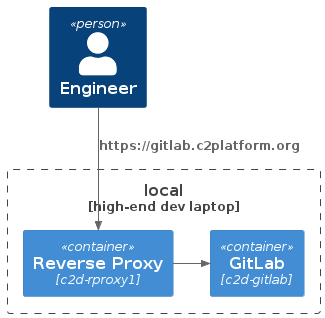
Setup
vagrant up c2d-gitlab
Root password
The GitLab installer creates a password for the root account in a file /etc/gitlab/initial_root_password. The file will be deleted after 24 hours.
vagrant ssh c2d-gitlab -c "sudo cat /etc/gitlab/initial_root_password | grep Password:"
Via Profile
change password equal to supersecret.
Access token
Via Profile → Access Tokens create an access token.
Verify
Start SOCKS proxy
ssh c2d_socks
You should be able to navigate to https://gitlab.c2platform.org
and login as root.
Links
Feedback
Was this page helpful?
Glad to hear it! Please tell us how we can improve.
Sorry to hear that. Please tell us how we can improve.