Set Up the Ansible Development Desktop Node
Create the c2d-devtop
Ansible development desktop node with Vagrant. This node simulates the host development desktop used for
Ansible engineering.
Projects:
c2platform/c2/ansible-inventory , c2platform.dev.desktop
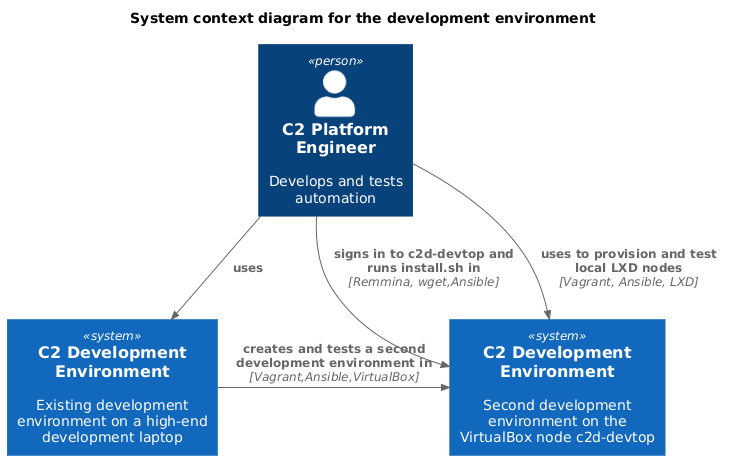
The development environment is a key concept within the C2 Platform. C2 Platform aims to automate everything fully and immediately, including the development environment that engineers use to develop and test automation. That makes this how-to set important: it explains not only how to use a C2 Platform development environment, but also how to create, inspect, test, and adapt the automation behind it.
The guides on this page show how to use an existing
development environment
to provision the VirtualBox node c2d-devtop, and then use c2d-devtop as a
safe sandbox to bootstrap and test another personal C2 Platform development
environment. In that sandbox you can experiment, provision local LXD nodes,
inspect the desktop role
(c2platform.dev.desktop ),
and develop or modify the automation for the development environment itself
without breaking the host environment.
Create the c2d-devtop
Ansible development desktop node with Vagrant. This node simulates the host development desktop used for
Ansible engineering.
Learn how to run the one-command install script on the c2d-devtop node. The script executes the desktop role in local play mode to set up a personal development environment for a local user.
TODO
Was this page helpful?
Glad to hear it! Please tell us how we can improve.
Sorry to hear that. Please tell us how we can improve.